Complex Breakpoints
Complex breakpoints let you build multi-step breakpoint patterns instead of a single stop condition. They are managed from the Complex Breakpoints dock, which is tabbed with the regular breakpoint tools by default.
Opening the Complex Breakpoints Dock
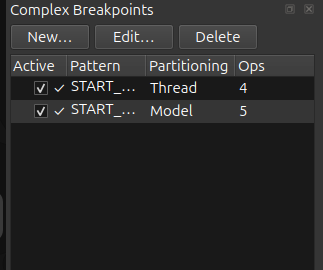
Select the Complex Breakpoints tab from the left-side dock group. The view contains a toolbar and a tree listing the currently defined patterns.
Pattern List
Each row in the list summarizes one complex breakpoint:
- Active
-
Shows whether the pattern is enabled.
- Summary
-
A compact operation-by-operation description.
- Partitioning
-
Shows whether the pattern is keyed per Thread or per Model.
- Ops
-
The number of operations in the pattern.
The summary is truncated in the table when the pattern becomes long, but the full operation breakdown is available in the tooltip.
Creating, Editing, and Deleting Patterns
The dock toolbar provides three actions:
- New
-
Opens the pattern builder for a new complex breakpoint.
- Edit
-
Opens the selected pattern in the same builder dialog.
- Delete
-
Removes the selected pattern after confirmation.
The row context menu offers the same actions. Double-clicking a row is a shortcut for Edit….
Pattern Builder Layout
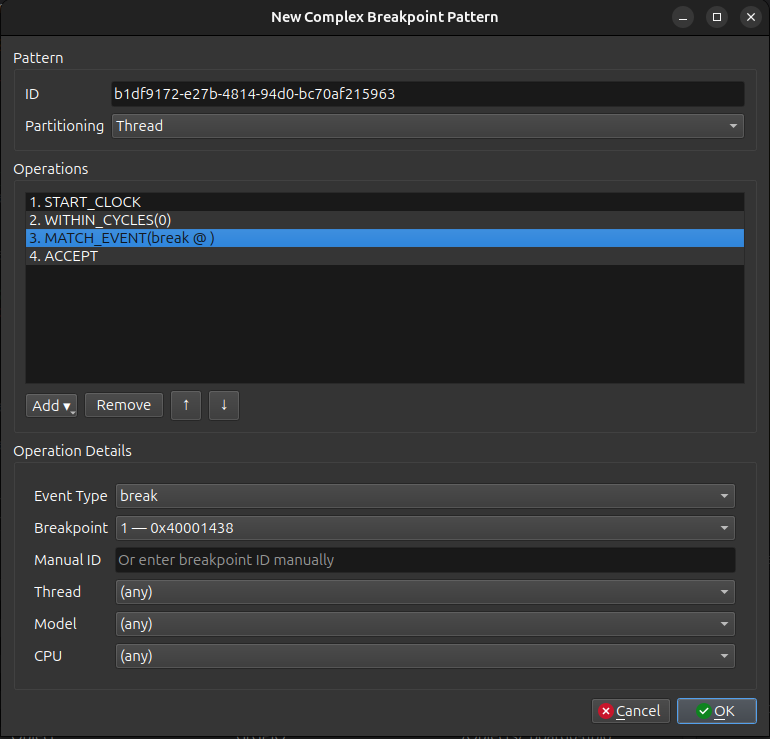
The builder dialog is split into three main areas.
Pattern Header
- ID
-
A generated identifier that is shown read-only.
- Partitioning
-
Choose Thread to track state independently per thread, or Model to track it per hardware object.
Operations List
The center list holds the pattern program in execution order. Use the toolbar beneath it to:
-
add a new operation from a dropdown menu,
-
remove the selected operation,
-
move the selected operation up,
-
move the selected operation down.
The available operation types are:
-
NOP -
START_CLOCK -
WITHIN_NS -
WITHIN_CYCLES -
WITHIN_STEPS -
MATCH_EVENT -
NOT_EVENT_UNTIL_NEXT -
CAPTURE -
ACCEPT
Operation Details
Selecting an operation opens its parameter page in the lower part of the dialog.
- MATCH_EVENT
-
Choose the event type and any optional restrictions. The current GUI supports
break,ethPkt_tx, anduartByte_tx.For
breakevents you can either pick an existing breakpoint from the list or type a breakpoint ID manually. You can also narrow the match to a specific thread, model, or CPU. - WITHIN_NS / WITHIN_CYCLES / WITHIN_STEPS
-
Enter the numeric window value for the selected unit.
- CAPTURE
-
Choose the capture slot index from
0to3. - NOT_EVENT_UNTIL_NEXT
-
Choose the inhibitor event that cancels the pattern if it occurs before the next match.
- NOP / START_CLOCK / ACCEPT
-
These operations do not expose extra fields in the details pane.