Source Code View
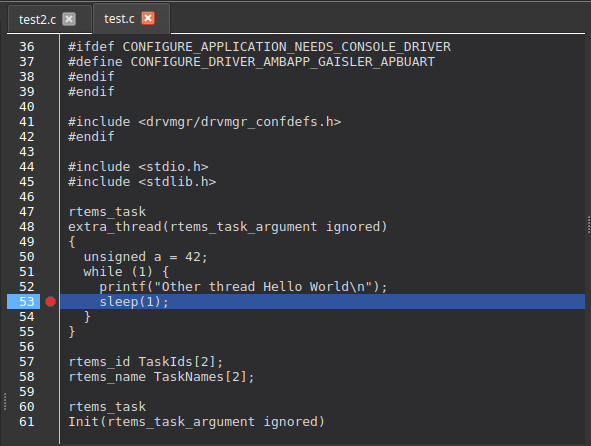
The Source Code View is the main text view used when you inspect the target’s program text. It provides a tabbed interface for opening and browsing source files while you are debugging.
The view is read-only. It shows the file as it exists on disk, so edit sources in your normal editor and rebuild the target software to see the change.
Opening and Managing Files
-
Double-click a file in the File Explorer to open it in a new tab. If the file is already open, the existing tab is activated instead.
-
Files opened indirectly, for example by jumping to a symbol definition or by stopping at a breakpoint, are opened in the same way.
-
Recently opened files remain visible as tabs for one-click access.
-
Each tab is labeled with the file name and can be closed with its close button.
-
Drag tabs to reorder them.
Tabs are identified by their full canonical path, so you won’t accidentally open the same file twice from different locations.
Navigation
-
Explorer clicks are the fastest way to bring a source file into view.
-
Jump to Definition in the context menu moves to a symbol’s definition, see Context Menu Actions.
-
Selecting a frame in the stack trace opens the file for that frame and moves the highlight to its line.
Execution-Point Indicators
-
When the debugger is paused the line currently being executed is highlighted in the active source tab.
-
If several threads are stopped, each thread is marked with a colored band beside its line; hovering shows the thread’s ID or name.
-
Where several threads sit on the same line, the gutter shows a single marker with the thread count, and its tooltip lists the threads.
-
Picking a different stack frame in the call stack panel moves the highlight to that frame’s location.
-
The view scrolls automatically to keep the highlighted line visible when you step through code.
Breakpoints from the Source View
-
Click in the left gutter, the margin beside the line numbers, to toggle a breakpoint on that line. A red circle marks an enabled breakpoint.
-
Disabled breakpoints are drawn as a gray circle crossed by a diagonal line.
-
Hovering over the gutter previews where the breakpoint will be placed.
-
Breakpoints toggled here are the same breakpoints listed in the Breakpoints panel, so enabling, disabling, or deleting one there is reflected in the gutter, see Breakpoint Management.
Context Menu Actions
Right-click a word in the source text to act on the symbol under the cursor. Both actions resolve the symbol against the current software context.
- Jump to Definition of "<symbol>"
-
Looks the symbol up in the target’s debug information, maps its address back to a source location, and opens that file at the defining line. Project path mappings are applied, so target paths resolve to your local workspace, see Project Management & File Explorer.
- Set Watchpoint on "<symbol>"
-
Resolves the symbol using the scope of the line you clicked, so a local variable is matched in the right frame, then creates a read watchpoint on it. The new watchpoint appears in the watchpoint list, where its access mode and size can be changed, see Watchpoint Management.
Progress and failures are reported in the status bar, for example when a symbol is not present in the debug information or has no source-line information.
| Both actions need symbol information from the target. Connect first, and make sure the software context is loaded with debug information. |